Introduction: Your Launchpad to E-commerce Dominance in 2025
For a startup, choosing the wrong platform can lead to costly migrations, missed opportunities, and stifled scalability. The right one, however, empowers you to launch fast, iterate quickly, connect with customers, and expand without limits. This comprehensive guide is designed for founders, startup teams, digital marketers, and small business owners who are navigating this critical decision. We’ll cut through the noise, offering direct, actionable advice on the best e-commerce platforms for startups in 2025, detailing their strengths, weaknesses, and what makes them suitable for your entrepreneurial journey.
By the end of this article, you’ll have a clear understanding of the platforms best suited for rapid growth, the critical criteria for evaluation, and a strategic framework to ensure your e-commerce engine is primed for success.
Why Your E-commerce Platform Choice is Your Startup’s Strategic Asset
Think of your e-commerce platform not merely as a place to list products, but as the digital backbone of your entire operation. It impacts everything from your marketing capabilities and customer experience to your inventory management and financial reporting. For a startup, where agility and resourcefulness are paramount, this decision carries even greater weight.
A well-chosen platform offers:
- Speed to Market: Launching quickly is vital. The right platform minimizes setup time, allowing you to validate your product and reach customers faster.
- Scalability: Startups are built to grow. Your platform must be capable of handling increased traffic, sales volume, and product catalogs without requiring a complete overhaul.
- Cost Efficiency: Every dollar counts. Understanding the total cost of ownership – not just subscription fees, but transaction fees, app costs, and development expenses – is crucial.
- Flexibility & Customization: While an MVP might be simple, your brand will evolve. The platform needs to offer enough flexibility to customize your storefront, integrate essential tools, and adapt to changing market demands.
- SEO & Marketing Edge: In 2025, discoverability is everything. Your platform must provide robust SEO tools, integration with marketing channels, and analytics to drive customer acquisition.
Key Criteria: What Startups Need in an E-commerce Platform for 2025 and Beyond
Before diving into specific platforms, let’s establish a framework for evaluation. As a savvy tech entrepreneur, you need to consider more than just the flashy features. Here are the non-negotiable criteria:
1. Scalability: Grow Without Rebuilding
Your platform must seamlessly accommodate growth. Can it handle:
- Increased Traffic: From hundreds to millions of visitors?
- Larger Product Catalog: From a handful of SKUs to thousands?
- Multiple Sales Channels: Integrating with social media, marketplaces, or even physical stores?
- International Expansion: Multi-currency, multi-language, and localized payment options?
Actionable Tip: Look for platforms with tiered pricing that explicitly outlines scaling capabilities. Inquire about server capacity and uptime guarantees.
2. Ease of Use & Management: Focus on Your Business, Not Your Backend
Time is your most valuable asset. The platform should be intuitive for you and your team.
- Setup & Configuration: How quickly can you get a basic store operational?
- Product Management: Is it easy to add, update, and manage inventory?
- Order Fulfillment: Streamlined processes for shipping, tracking, and returns.
- Dashboard & Analytics: Clear, actionable insights into sales, traffic, and customer behavior.
Actionable Tip: Take advantage of free trials. Have different team members (marketing, operations) test the backend to ensure it meets their needs.
3. Features & Integrations (Apps): Extend Your Capabilities
No single platform does everything perfectly. A rich app ecosystem allows you to extend functionality.
- Core Features: Secure checkout, mobile responsiveness, basic reporting.
- App Store/Plugins: Access to third-party integrations for email marketing, accounting, CRM, dropshipping, subscription services, etc.
- API Access: For custom integrations and advanced development.
Actionable Tip: List out your absolute “must-have” integrations (e.g., specific email provider, accounting software) and verify their availability on each platform’s app store.
4. SEO & Marketing Tools: Get Found and Convert
Your beautiful store is useless if no one can find it.
- SEO Features: Customizable URLs, meta tags, alt text, sitemaps, clean code structure.
- Marketing Integrations: Easy connections to Google Analytics, Facebook Pixel, email marketing platforms, and ad channels.
- Blogging Functionality: Essential for content marketing and driving organic traffic.
Actionable Tip: Check if the platform allows full control over SEO elements and if it’s praised by SEO experts for its clean code and performance.
5. Payment Gateways & Security: Trust and Compliance
Customers need to feel safe making purchases.
- Payment Options: Support for major credit cards, PayPal, Apple Pay, Google Pay, and localized payment methods.
- Security: PCI compliance, SSL certificates, fraud prevention tools.
- Transaction Fees: Understand how much the platform charges on top of payment processor fees.
Actionable Tip: Prioritize platforms that handle PCI compliance for you, significantly reducing your burden and risk.
6. Pricing & Hidden Costs: Beyond the Monthly Fee
The sticker price is rarely the full story.
- Subscription Tiers: Understand what features are unlocked at each level.
- Transaction Fees: Some platforms charge a percentage of each sale if you don’t use their proprietary payment gateway.
- App/Plugin Costs: Many essential integrations come with their own monthly fees.
- Theme/Design Costs: Premium themes can range from $100-$300+.
- Development/Customization: If you need unique features, these costs can add up.
Actionable Tip: Create a realistic 12-month budget that includes all potential costs, not just the monthly subscription.
7. Support & Community: Don’t Get Stuck
When issues arise, prompt and effective support is invaluable.
- Support Channels: 24/7 chat, email, phone, knowledge base.
- Community Forums: A vibrant community can often provide quick solutions and advice.
- Documentation: Comprehensive guides and tutorials.
Actionable Tip: Reach out to customer support during your trial period with a couple of questions to gauge response time and quality.
The Contenders: Best E-commerce Platforms for Startups in 2025
Now, let’s dive into the platforms that stand out as the best e-commerce platforms for startups in 2025, offering a blend of features, scalability, and ease of use.
1. Shopify: The All-Rounder for Rapid Growth
- Pros:
- Ease of Use: Intuitive interface, drag-and-drop store builder, minimal technical expertise required. You can literally launch a basic store in a day.
- Scalability: Handles everything from small businesses to enterprise-level operations (Shopify Plus).
- App Store: A massive ecosystem of over 8,000 apps for virtually any functionality you can imagine (marketing, inventory, shipping, customer service).
- Robust Hosting & Security: Shopify handles all hosting, security, and PCI compliance, freeing you to focus on your business.
- Shopify Payments: Their integrated payment gateway offers competitive rates and simplifies reconciliation.
- Multichannel Sales: Easy integration with social media, marketplaces (e.g., Amazon, eBay), and even POS systems for physical retail.
- Cons:
- Transaction Fees: If you don’t use Shopify Payments, you’ll incur additional transaction fees (0.5% to 2% depending on your plan).
- App Costs: Many essential apps come with recurring monthly fees, which can add up.
- Customization Limits: While themes are highly customizable, deep code-level modifications can be more complex than open-source alternatives.
- Content Marketing: Its blogging features are functional but not as robust as dedicated CMS platforms like WordPress.
- Best For:
- DTC Brands: Ideal for direct-to-consumer startups focused on branding and customer experience.
- Dropshippers: Excellent integrations with dropshipping apps.
- Product-Focused Startups: Especially those with physical or digital products needing a fast launch and reliable infrastructure.
- Founders seeking simplicity and speed.
- Actionable Tip: Start with a basic Shopify plan (e.g., Basic Shopify) and leverage free apps initially. As you grow, evaluate which paid apps provide the most ROI and consider upgrading your plan to reduce transaction fees. Don’t over-customize too early; focus on core functionality.
2. BigCommerce: Scalability Without Compromise
BigCommerce often flies under the radar compared to Shopify, but it’s a powerhouse, particularly for startups with more complex product catalogs, B2B aspirations, or those planning significant international expansion. It’s known for its robust built-in features, reducing reliance on apps.
- Pros:
- Feature-Rich Out-of-the-Box: Comes with advanced features like abandoned cart saver, professional reporting, and flexible product options without needing extra apps.
- No Transaction Fees: BigCommerce doesn’t charge additional transaction fees on any plan, regardless of your payment gateway, which can lead to significant savings for high-volume stores.
- Strong SEO Tools: Generally considered to have excellent native SEO capabilities.
- B2B Functionality: Offers built-in features for customer groups, tiered pricing, and purchase orders, making it strong for B2B startups.
- Headless Commerce Ready: Easily integrates with popular CMS platforms (WordPress, Drupal) for a headless setup, offering ultimate frontend flexibility (more on this below).
- Internationalization: Robust multi-currency and multi-language support.
- Cons:
- Steeper Learning Curve: While still user-friendly, its vast array of features can feel slightly more complex than Shopify for absolute beginners.
- Design Flexibility: Theme options, while improving, are not as extensive or as customizable as Shopify’s without diving into code.
- Pricing Tiers: Your plan automatically upgrades based on your annual sales volume, which can be a surprise for rapidly growing startups.
- Best For:
- Larger Startups/SMBs: Those with complex product catalogs or immediate plans for significant scale.
- B2B E-commerce: Excellent native features for wholesale and business clients.
- Startups with Unique Product Configurations: Offers extensive options for product variants and custom fields.
- Companies prioritizing built-in features over extensive app reliance.
- Actionable Tip: If your startup has specific product variations or B2B components, thoroughly compare BigCommerce’s built-in features against Shopify’s app ecosystem. The lack of transaction fees can be a major cost advantage as you scale.
3. WooCommerce (WordPress): Ultimate Flexibility for the Tech-Savvy
WooCommerce isn’t a standalone platform; it’s a free, open-source plugin that transforms any WordPress website into a fully functional e-commerce store. It powers an estimated 23% of all online stores, making it incredibly popular, especially among those who already use WordPress for their content.
- Pros:
- Ultimate Flexibility & Control: Being open-source, you have complete control over every aspect of your store, from design to functionality, with no vendor lock-in.
- Cost-Effective Core: The plugin itself is free. Your main costs are hosting, a domain, and premium extensions/themes.
- Massive Ecosystem: Thousands of free and paid extensions (plugins) and themes available, often with one-time purchase costs rather than recurring subscriptions.
- SEO Powerhouse: Inherits WordPress’s exceptional SEO capabilities, allowing for powerful content marketing strategies.
- Community Support: A vast global community of developers and users means endless resources and support.
- Cons:
- Technical Expertise Required: Requires more technical know-how for setup, maintenance, security, and updates. You’re responsible for hosting, backups, and server performance.
- Hidden Costs: While the plugin is free, reliable hosting, premium themes, and essential extensions can add up.
- Performance: Can become slow if not properly optimized, especially with many plugins or poor hosting.
- No Central Support: Support is typically through the community, your hosting provider, or individual plugin developers, which can be fragmented.
- Best For:
- Tech-Savvy Founders: Those comfortable with WordPress or who have development resources.
- Content-Driven Startups: Businesses where content marketing (blogs, guides) is as crucial as product sales.
- Customization Seekers: Startups with highly specific design or functionality requirements that off-the-shelf platforms can’t meet.
- Budget-Conscious but technically capable teams.
- Actionable Tip: Invest in high-quality managed WordPress hosting specifically optimized for WooCommerce (e.g., Kinsta, WP Engine, SiteGround). This will alleviate much of the technical burden and improve performance. Carefully select only essential plugins to avoid bloat.
4. Emerging & Niche Players: Headless Commerce for the Ambitious Startup
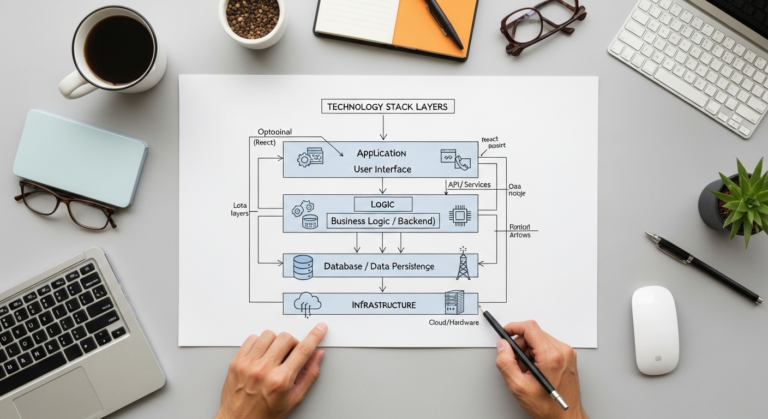
For startups planning aggressive growth, unique customer experiences, or integration with diverse channels, “headless commerce” is a trend gaining significant traction by 2025. This approach decouples the frontend (what customers see) from the backend (the e-commerce engine).
- How it works: Your e-commerce platform (e.g., Shopify Plus, BigCommerce Enterprise, Commercetools, Magento Open Source) handles product data, inventory, and transactions via APIs. A separate frontend (built with frameworks like React, Vue.js, Next.js, or even a sophisticated CMS) delivers the visual experience.
- Pros:
- Unrivaled Flexibility: Complete creative control over the customer experience. Build unique UIs, integrate with AR/VR, IoT devices, voice assistants, etc.
- Performance: Often leads to lightning-fast load times, crucial for SEO and conversion rates.
- Omnichannel Excellence: Deliver consistent experiences across web, mobile apps, in-store kiosks, and emerging channels from a single backend.
- Future-Proofing: Allows you to swap out frontend technologies without disrupting your core e-commerce operations.
- Cons:
- Higher Initial Cost & Complexity: Requires significant development resources and a strong technical team. Not for the faint of heart or tight budgets initially.
- Maintenance: Managing two separate systems (frontend and backend) can be more complex.
- Integration Challenges: Connecting the frontend to backend APIs requires expertise.
- Best For:
- Highly Innovative Startups: Businesses looking to offer truly unique, cutting-edge customer experiences.
- Content-Heavy Brands: Where a traditional e-commerce CMS isn’t sufficient for rich media and interactive content.
- Startups with Significant Funding: Those who can invest in a dedicated development team from day one.
- Enterprise-bound startups anticipating rapid global expansion.
- Actionable Tip: While potentially overkill for an MVP, understand headless options. If your startup is backed by significant funding and aims for a highly differentiated digital experience, consider platforms like Shopify Plus or BigCommerce Enterprise which offer robust API access. Start with a simpler platform, and plan for a headless migration down the line if your needs dictate it.
Navigating the Costs: Budgeting for Your E-commerce Success
Understanding the true cost of an e-commerce platform is critical for any startup. It’s rarely just the monthly subscription fee. Here’s a breakdown of what to factor into your budget:
- Platform Subscription Fees: The most obvious cost. Ranges from ~$29/month (Basic Shopify) to hundreds or even thousands for enterprise plans. These fees typically scale with features and sometimes sales volume.
- Transaction Fees: Some platforms (like Shopify, if you don’t use Shopify Payments) charge a percentage on top of your payment gateway’s fees. BigCommerce notably charges no transaction fees.
- Payment Gateway Fees: Your chosen payment processor (Stripe, PayPal, etc.) will charge a percentage per transaction, typically 2.9% + $0.30.
- App/Plugin Costs: Many essential integrations (email marketing, upsells, loyalty programs) come with recurring monthly fees, ranging from $5 to $100+ per app.
- Theme/Design Costs: While free themes are available, a premium, professional theme often costs between $100 and $300 (one-time). Custom design work can be thousands.
- Domain Name: A small annual fee ($10-$20).
- Hosting (for self-hosted platforms like WooCommerce): Essential for performance and security, ranging from $10/month for shared hosting to hundreds for managed WordPress/WooCommerce hosting.
- Development/Customization Costs: If you need unique features, integrations, or complex design work, hiring developers can be a significant expense.
- Marketing & Advertising: Beyond the platform, you’ll need a budget for customer acquisition through SEO, SEM, social media ads, and email campaigns.
- Ongoing Maintenance & Support: For self-hosted solutions, factor in time or cost for updates, backups, and security. Even SaaS platforms may require occasional expert assistance.
“A common mistake for startups is underestimating the total cost of ownership. The monthly subscription is just the tip of the iceberg. Always budget for apps, payment processing, and potential development work.” – Eamped Editorial Team
Future-Proofing Your Store: Trends for 2025 and Beyond
To ensure your startup’s e-commerce platform remains relevant and competitive, it’s crucial to consider emerging trends that will shape the digital commerce landscape in 2025 and beyond.
- AI & Personalization: AI will drive hyper-personalized shopping experiences, from product recommendations and dynamic pricing to AI-powered customer service chatbots. Platforms with robust AI integration capabilities will have an edge.
- Social & Conversational Commerce: The lines between social media, messaging apps, and shopping will blur further. Selling directly within platforms like TikTok, Instagram, and WhatsApp will become standard.
- Omnichannel Experiences: Customers expect seamless interactions across all touchpoints – online, mobile, physical stores. Your platform needs to support unified data and consistent experiences.
- Subscription Models & Recurring Revenue: More businesses will adopt subscription boxes, replenishment services, or membership models. Look for platforms and apps that facilitate recurring payments and customer management.
- Sustainability & Ethical Sourcing: Consumers are increasingly prioritizing brands with strong environmental and social values. Platforms that allow for transparent storytelling and integrate with sustainable supply chain solutions will resonate.
- Augmented Reality (AR) & Virtual Reality (VR): “Try before you buy” experiences through AR will become more common, especially for fashion, furniture, and beauty. VR shopping environments are also on the horizon for niche markets.
Actionable Tip: While you may not implement all these trends on day one, choose a platform that is flexible enough to integrate these technologies later. Prioritize platforms with open APIs and a forward-thinking development roadmap.
Making the Right Choice: An Actionable Framework for Startups
With all this information, how do you actually make the decision? Here’s a structured approach:
- Define Your Minimum Viable Product (MVP): What are the absolute essential features you need to launch and make your first sale? Don’t get bogged down by “nice-to-haves” initially.
- List Your Non-Negotiables: Based on the criteria above, identify your top 3-5 critical requirements (e.g., “must integrate with X ERP,” “no transaction fees,” “must support international shipping”).
- Assess Your Team’s Technical Prowess: Do you have developers on staff? Are you comfortable managing servers? This will heavily influence whether a SaaS solution (Shopify, BigCommerce) or an open-source option (WooCommerce) is right for you.
- Calculate Total Cost of Ownership (TCO): As discussed, budget for 12-18 months, including subscriptions, apps, payment fees, potential development, and marketing.
- Take Advantage of Free Trials: Sign up for trials of your top 2-3 platforms. Go through the process of setting up a product, customizing a theme, and running a test order. This hands-on experience is invaluable.
- Read Reviews & Talk to Other Founders: Beyond marketing claims, what are real users saying? Look for reviews from businesses similar to yours.
- Plan for Growth, but Don’t Overbuild: Choose a platform that can scale with you, but don’t invest in enterprise-level features or a complex headless setup if you’re still validating your product. You can always migrate or upgrade later.
“The best e-commerce platform for your startup isn’t just about features; it’s about the platform that empowers your specific team and business model to achieve its unique vision with the least friction and highest ROI.” – Eamped Editorial Team
Conclusion: Build to Scale, Conquer to Grow
Choosing the best e-commerce platform for your startup in 2025 is a critical decision that will impact your business for years to come. Whether you opt for the robust simplicity of Shopify, the comprehensive scalability of BigCommerce, or the unparalleled flexibility of WooCommerce, remember that the right choice aligns with your current resources, future ambitions, and specific business model.
As the digital landscape continues to evolve, your platform must be a strategic asset, not a technical burden. Evaluate carefully, plan for growth, and empower your team to focus on what matters most: building an incredible product, connecting with your customers, and driving your startup’s success. Your journey to e-commerce dominance starts with this choice – make it wisely.
Next Step: Take action today. Sign up for free trials of your top two platform choices, build out a basic store, and experience firsthand which ecosystem best fits your startup’s needs and vision.